Outlook Web Part
Outlook Web Part
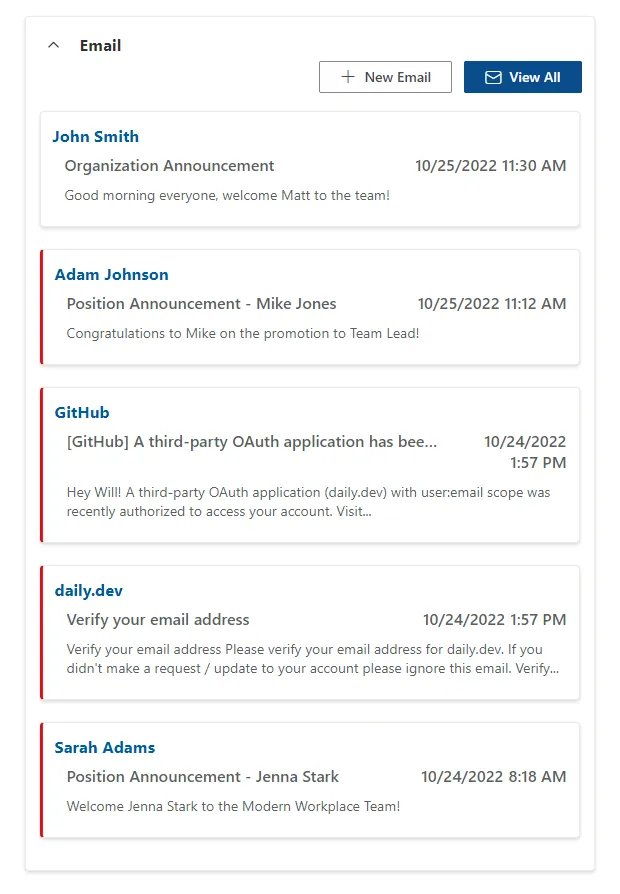
A SharePoint web part that displays a list of emails from the current user's Outlook inbox.
Key Features
- View current user's Outlook inbox
- Open emails in Outlook
- Create new emails in Outlook
- Launch full Outlook application
- Delete and flag emails from the web part
Project Progress
Overview
This web part was built to be used on a SharePoint landing page that was tailored to each individual user. Every user saw a different combination of web parts based on their role and permissions, and each one was personalized to surface information specific to them. This web part was built to show the current user’s Outlook inbox and allow them to see their emails, open them in Outlook, create new emails, and launch the full Outlook application, and flag or delete emails right from the web part without having to leave the SharePoint page.
Technical Details
Architecture
- Frontend: React, TypeScript, Styled Components, SharePoint Framework (SPFx), Fluent UI React
- Deployment: SharePoint Online
- APIs: SharePoint REST API, Outlook API, Microsoft Graph API
Development Process
Challenges
- Designing the UI: I needed to design the UI to look and feel like Outlook so users would feel right at home using the web part but also feel like it belonged on the landing page for the company.
- Responsiveness: The web part needed to be extremely responsive and be able to handle a variety of screen sizes, devices, and locations on the SharePoint page.
Lessons Learned
- This was one of my first times working with container queries, and I really enjoyed getting to use them because it helped out with the responsiveness a ton. These web parts can be added anywhere on a page, so the content inside them is components, and everything can’t just rely on the size of the window. It needs to be aware of where it’s placed in the page, so that really came in handy knowing how to work with the container queries and then utilize that. The web part could change how it looked and behaved depending on not only the size of the screen but where it is on the page and how much space the web part had.
- I also got to learn a lot about the Fluent UI design system and working with the Outlook APIs and Microsoft Graph to get and interact with the current user’s emails.
Conclusion
This was an interesting project because it was also really heavily used because users wanted to just have a one-stop shop for all of their Office applications. This way they were able to see their inbox and their calendar and all of their other work-related applications in one place, without having to switch tabs in the browser or switch between multiple apps. It really helped productivity by preventing a ton of contact switching.